Pertanyaan Umum
Pertanyaan tentang Scripture Forge
-
Bagaimana Scripture Forge cocok dengan langkah-langkah penerjemahan saya?
Scripture Forge adalah alat yang dirancang untuk membantu Anda menavigasi fase pembuatan konsep dengan lebih efektif dan cepat dengan tetap menjaga kualitas pekerjaan Anda. It is not a replacement for the translation steps. Instead, think of it as a resource to help you be more productive while drafting and community checking.
-
Apakah Scripture Forge menyimpan cadangan data proyek saya? Siapa yang bertanggung jawab untuk menjaga keamanan data?
Scripture Forge mengelola versi proyek di server yang dikendalikan SIL, dan bertanggung jawab untuk menjaga keamanan proyek tersebut. Proyek ini juga disinkronkan dengan proyek Paratext Anda, yang disimpan di server Paratext. Perlu diketahui bahwa data dapat dikirimkan melalui Internet ketika Anda terhubung ke antarmuka Scripture Forge secara daring
-
Bagaimana saya bisa mendapatkan dukungan atau bantuan dari tim SF?
Anda dapat menggunakan tautan berikut untuk menghubungi kami atau menemukan dukungan:
- Learning and Documentation: https://software.sil.org/ScriptureForge and https://help.scriptureforge.org
- Report an issue: https://scriptureforge.freshdesk.com/support/tickets/new email: help@scriptureforge.org
- Questions and Support: email: help@scriptureforge.org
Pertanyaan tentangmodel Sumber dan Pelatihan
-
Bagaimana cara meningkatkan kualitas Konsep saya?
Ada 2 cara utama untuk memperbaiki konsep.
- Yang pertama adalah menambahkan lebih banyak data ke model Terjemahan. You can do this by choosing more books in Step 2 - "Select books to train on." Semakin banyak data yang tersedia untuk pelatihan, semakin baik pula hasil konsepnya.
- Cara kedua adalah dengan meningkatkan kualitas data dalam Model Penerjemahan. Anda dapat melakukan ini dengan memastikan kitab yang Anda pilih telah diperiksa dengan baik dalam konsistensi di berbagai bidang seperti ejaan, tanda baca, dan maknanya. Semakin baik kualitas data, semakin baik pula sistem akan belajar untuk menghasilkan konsep yang baik.
- Banyak tim juga merasakan manfaat dari penggunaan terjemahan terbaru sebagai sumber pelatihan tambahan
-
Mengapa Anda ingin saya menetapkan sumber pelatihan terpisah yang bukan sumber utama saya?
Jika ada teks yang lebih mirip dengan terjemahan Anda, maka akan lebih mudah bagi model untuk mempelajari hubungan antara kedua bahasa. Sumber pelatihan terpisah tidak selalu diperlukan, tetapi merupakan pilihan yang kami sediakan
-
Bagaimana cara mengubah sumber atau menggunakan versi yang berbeda untuk melatih model penerjemahan?
Anda dapat mengubah sumber proyek Anda dengan menavigasi ke Pengaturan dan kemudian memilih sumber yang diperlukan sebagai sumber di bawah "Terjemahkan."
-
Mengapa kitab yang saya inginkan tidak terlihat dalam daftar kitab saya?
Kitab ini harus ada di proyek sumber dan target di Paratext. Pastikan hal ini dan kemudian jalankan kirim/terima di Paratext dan sinkronisasi di Scripture Forge sehingga Scripture Forge memiliki informasi terbaru dari Paratext
-
Mengapa ada tanda seru berwarna merah saat saya memilih terjemahan sumber utama baru di halaman Pengaturan?
Ini berarti bahwa pengaturan sumber tidak berhasil. Anda dapat memuat ulang halaman dan mencoba lagi
Pertanyaan tentang Pembuatan Konsep
-
Berapa lama waktu yang dibutuhkan untuk membuat konsep saya?
Drafts currently take roughly an hour and a half to generate, but can sometimes take much longer depending on server availability and the number of books requested. Jika pembuatan konsep membutuhkan waktu yang sangat lama, silakan melaporkan masalah ini kepada kami.
-
Bagaimana saya bisa tahu kapan konsep saya selesai?
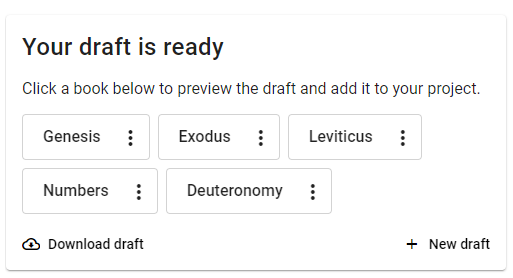
You can opt-in to receive email notifications when your draft generation completes, so you'll be notified immediately. Alternatively, you can check the "Generate draft" page to see the status. When it's done, you'll see a message similar to this:
-
Mengapa kitab saya hanya memiliki Pasal 1 dalam proyek ini?
- Adding a draft to the project happens on a chapter-by-chapter basis from the "Generated draft" tab in the Edit & review page. Jadi, jika hanya satu pasal yang ditambahkan, pasal tersebut akan menjadi satu-satunya pasal yang tersedia dalam proyek. Pasal lain harus ditambahkan secara terpisah.
- You can add the whole book by navigating to "Generate draft" and finding the draft that has been generated. Click "Add to a project" and choose the project you want to add it to.
-
Why does my button say "re-add to project"?
Jika Anda menyunting pasal setelah "menambahkan ke proyek" dan ingin kembali ke konsep SF yang belum disunting, Anda dapat mengimpor kembali konsep asli dengan mengklik tombol "Tambahkan kembali ke proyek"
-
Apa yang ditampilkan tab Riwayat?
Ketika Anda membuat perubahan pada konsep Anda, Scripture Forge menyimpan versi perubahan tersebut yang dapat Anda akses melalui tab riwayat. Anda dapat mengembalikan proyek Anda ke versi yang lebih lama dari sini dengan mengklik tombol "Kembalikan versi ini".
-
Why is my book introduction cut short?
Scripture Forge uses the NLLB model to generate drafts. NLLB is a sentence model, and it is most accurate with short segments of text. To maximize accuracy, there is a limit of 200 tokens (word parts) per translated segment, and any text after that point is cut off. Scripture verses are translated one-by-one and very rarely exceed this limit. Paragraph-length book introductions that are longer than the allowed length will be cut off short, and only the first portion will be translated.
Questions on draft quality warnings
-
Why do I see a warning that my draft may have lower than normal quality? What should I do if I see this warning?
Scripture Forge uses automated metrics to determine whether model training was successful enough to prepare a draft of the requested books. Sometimes these metrics indicate that draft quality may be poor.
The most common reason for this warning is that there is not enough example text of the kind needed to train the model. Usually, this situation results from an error in setting up the draft request. Use the following checklist as a guide to check your draft generation configuration.
- Project: Are you generating the draft from a project that includes all completed books in the project?
- It is important not to request drafts from a project used to store AI drafts.
- If some translated books, such as the New Testament, are stored in a separate Paratext project, you may need to create a new project and import all translated books to that project. You can use that project for draft generation.
- Language codes: Does the language code for each reference and source project match the text of that project?
- You can update language codes in Paratext under “Project properties.”
- Draft Books: Are the book or books to draft selected in Step 2, “Select books to draft”?
- Training Books: Are all the completed and checked books in the project selected in Step 3, “Select books to train on”?
- Be sure all the books used for training have been checked by the team. They should be generally consistent in spelling, character use (keyboarding), dialect, and vocabulary.
- Be sure the reference text contains all the books used for training, and that they are selected at the bottom of Step 3.
- Back Translations: Are you using a back translation as a reference project? If so, check these things:
- Be sure the back translation language code represents the language of the back translation and not of the main translation project.
- If any books in the back translation project are in a different language than the rest of the back translation, unselect those books from the back translation area at the bottom of Step 3.
- Additional Data: Is it formatted correctly?
- If you uploaded additional data for model training on the “Configure sources” page, be sure that each row of that file contains sentences with the same meaning, with the source language on the left and the target language on the right.
- Project: Are you generating the draft from a project that includes all completed books in the project?
-
Why do I still see a low draft quality warning after completing all the checks?
Remember that the warning is based on an estimate of draft quality and may not reflect human judgment. Please review the draft carefully to determine whether it is useful in your translation work. The help text about Improving Draft Quality may be helpful.
If draft quality is still low after completing the recommended checks, you may need to translate more text before generating a draft. Early in a translation project, the choice of which book to draft next is important. For example, a model trained on the book of Luke is better prepared to draft Mark than to draft Romans. If you are working in the New Testament, please review the Guidelines for New Testament Draft Generation to learn about how book sequence can affect draft quality.
Please reach out to our team at help@scriptureforge.org for questions or help with improving draft quality.
-
What should I do if only some of the books I generated have a low draft quality warning?
A warning on any draft is a good reason to consider the checklist above. However, it may also be the case that your training data was a better fit for drafting some books than others. It is important to review each book draft carefully, especially those with a low quality warning, before deciding whether to use it in your translation process.